
Last month I was sitting in a waiting room, bored out of my mind, scrolling through my phone settings just to kill time. I stumbled across a random Reddit thread where someone mentioned making their phone look like actual glass. I thought it was some kind of screen protector trick, but no, it was an app called Transparent Live Wallpaper by RAM Apps.
I downloaded it right there in the waiting room. I had zero expectations. What happened next kept me entertained for the rest of that appointment and honestly for the whole week after.
How the Transparent Effect Actually Works
Here’s what everyone should know before downloading this. The transparent effect is not real transparency. It uses your rear camera to capture a live feed of whatever is behind your phone and displays it on your screen.
This creates the illusion that you are looking through the phone like glass. It is a clever trick, not actual magic, and the app is upfront about needing camera access for this.
My tip here is simple. Don’t use this feature if your rear camera lens has a smudge or a crack, because it will look blurry and can ruin the effect, like it did for me the first time I tried it.
3D Parallax Wallpapers That Actually Move
This was the feature that made my roommate grab my phone out of my hand. The 3D parallax wallpapers shift and move depth wise as you tilt your phone side to side.
It actually feels like you are looking into a little diorama instead of a flat screen. Some backgrounds have layered mountains, others have floating objects that drift at different speeds.
One mistake I made was leaving this active during a phone call while walking. My screen kept shifting so much from my hand movement that I fumbled answering a call. Keep this one for when your phone is sitting still on a table.
Rose Live Wallpaper With Falling Petals
This one is simple but weirdly relaxing. Rose petals gently fall your screen in a loop, and you can pick different color themes depending on your mood.
I put this on for a friend’s birthday, and she actually thought I customized it myself with some fancy software. It matters because sometimes you just want your phone to feel a little softer and less mechanical.
The only mistake people make is picking a busy home screen layout underneath it. Too many app icons and widgets clash with the falling petals, and it looks cluttered instead of pretty.
Mirror Live Wallpaper for a Reflective Screen
This feature also uses your camera, but instead of a live see through effect, it creates a mirror style reflection. I tested this in my bathroom, and it worked way better than expected for a quick hair check.
It matters if you want a genuinely useful party trick or just a quick way to check your face before a video call. It is not a replacement for an actual mirror in bright sunlight, though.
My tip is to clean your front camera lens first. Otherwise, your reflection looks foggy, and everyone will ask if your phone screen is broken.
Shake to Change Feature
This is exactly what it sounds like. Shake your phone, and it switches to a different wallpaper from your saved list automatically.
I found this surprisingly fun to show off to my nephew, who kept shaking my phone like a maraca for ten straight minutes. It matters for people who like variety without digging into settings every time.
The common mistake is forgetting this is turned on, then accidentally changing your wallpaper while your phone is in your pocket and you’re walking. I did this three times before I figured out what kept resetting my background.
Sakura Wallpaper With Cherry Blossoms
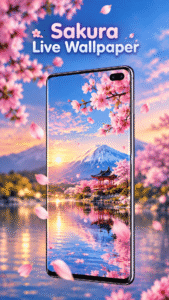
If you like a calmer aesthetic, this one gives you falling cherry blossoms drifting slowly down your screen. It has a peaceful, almost spring morning kind of feel to it.
This matters for anyone who wants their phone to feel a little less digital and a little more seasonal. I switched to this one in April, and it genuinely matched the mood outside my window.
One tip, this wallpaper looks best with darker icon packs. Light colored icons tend to blend into the pink petals and become harder to see at a glance.
Nature Wallpaper With Animated Scenes
This section includes multiple animated backgrounds like forests, waterfalls, and grassy fields with subtle movement. Clouds drift, water ripples, leaves sway a little.
It matters if you spend a lot of time staring at your phone and want something less sterile than a static photo. I used a waterfall scene during a stressful work week, and it helped more than I expected.
The mistake to avoid is picking a highly detailed nature scene if you already have a lot of home screen widgets. It becomes visually noisy fast.
Compass Live Wallpaper
This one puts a working compass right on your home screen, and yes, it actually functions using your phone’s sensors. I tested it while hiking and it stayed accurate the whole trip.
It matters for anyone who likes practical tools blended into their aesthetic instead of buried in an app drawer. It is a small feature but a clever one.
The common mistake is expecting pinpoint GPS level accuracy. It is a compass, not a full navigation system, so treat it as a helpful guide rather than your only tool.
Battery Usage From My Own Testing
I will be honest, live wallpapers do use more battery than a static image. The transparent camera based wallpaper drained my battery the fastest out of everything in the app.
On my phone, a Samsung Galaxy A54, I lost roughly seven to nine percent extra battery over a normal day when using the transparent effect regularly. The nature and sakura wallpapers were much lighter on battery since they do not use the camera constantly.
My tip is to save the camera based transparent wallpaper for when you actually want to show it off, not as your daily driver.
Performance Across Different Devices
I tested this app on three phones total. My main Galaxy A54, an older Redmi Note 9, and a Pixel 6a my brother let me borrow.
On the Pixel and Galaxy, everything ran smoothly with barely any lag. On the older Redmi Note 9, the parallax wallpapers stuttered a bit, and the transparent camera feed had a slight delay in refreshing.
So if you’re on an older or budget device, stick to the lighter wallpapers like Rose or Sakura for the smoothest experience.
The funniest moment happened when I forgot the transparent wallpaper was on and tried to answer a text while walking through my kitchen. I genuinely thought for half a second my phone had turned invisible, and I nearly dropped it trying to figure out where the screen went. My mom, who was in the room, laughed at me for a solid two minutes.