
In 2026, people care more than ever about how their phones look. A clean, modern, and stylish screen not only feels good but also helps you stay organized and focused. Whether you’re a student, a professional, or just someone who loves a neat setup, learning how to make your phone screen look stylish can completely change your daily experience.
The good news? Even if you’re not a tech expert, you can do it. With a few simple tweaks, you can turn your phone into something that looks both beautiful and professional.
Why Phone Customization Is Popular in 2026
Phone customization is no longer just for tech lovers. It has become common for everyone
Here’s why people are into it:
- Personal expression – Your phone reflects your personality
- Better productivity – A clean layout reduces distractions
- Aesthetic appeal – A stylish phone screen looks satisfying
- Social sharing – People love showing their setups online
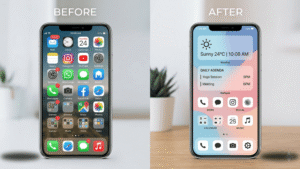
For example, let’s say you open your phone and see a dirty screen full of random apps. It feels stressful, right? Now imagine a clean layout with soft colors, organized icons, and useful widgets. That small change can actually improve your mood.
That’s the power of good phone customization.
Simple Ways to Make Your Phone Screen Look Stylish
You don’t need complicated tools. Start with these easy methods.
Use High-Quality Wallpapers
Your wallpaper is the first thing you see, so choose wisely.
Try this:
- Use minimalist backgrounds for a clean look
- Choose dark wallpapers to save battery and reduce eye strain
- Pick nature or abstract designs for a modern feel
For example, a simple black wallpaper with a soft gradient can instantly make your phone look premium.
Avoid cluttered images. They make icons hard to see.
Add Widgets
Widgets are little tools you can place on your home screen. They show useful information at a glance.
You can add:
- Clock widgets
- Weather updates
- Calendar reminders
- Battery status
In 2026, widgets are more customizable than ever. You can customize them in terms of size, color, and appearance.
Let’s say you add a clean clock widget at the top and a weather widget below it. Your screen will look both useful and stylish.
Customize App Icons
Default app icons can look dull. Changing them can give your phone a completely new vibe.
You can:
- Match icons with your wallpaper color
- Use minimal icon packs
- Try one color style or soft light colors
For example, if your wallpaper is blue, use matching blue icons for a consistent look.
This is one of the easiest ways to make your phone screen look stylish without much effort.
Use Live Wallpapers
Live wallpapers add motion to your screen.
They can be:
- Gentle animations
- Moving gradients
- Interactive designs
Keep it simple. Too much movement can feel distracting.
A soft-moving background can make your phone feel modern and fresh.
Step-by-Step Guide to Customize Your Phone
If you’re new, follow this simple process:
Step 1: Clean Your Home Screen
- Remove unused apps
- Keep only what you need daily
- Group similar apps into folders
Step 2: Choose a Theme
- Decide your color style (dark, light, blue, etc.)
- Keep everything consistent
Step 3: Set a Wallpaper
- Pick a high-quality image
- Make sure icons are easy to see
Step 4: Add Widgets
- Start with 1–2 widgets
- Place them neatly
Step 5: Customize Icons
- Choose a matching icon style
- Apply it across all apps
Step 6: Adjust Layout
- Keep spacing clean
- Avoid overloading
Step 7: Test and Improve
- Use your phone for a day
- Change anything that feels messy
This simple process works for both Android customization and other systems.
Best Tools to Customize Your Phone Easily
You don’t have to do everything manually. There are helpful tools that make customization easier.
Some tools help with:
- Changing app icons
- Creating widgets
- Setting custom layouts
- Applying themes
For example:
- Some launchers allow full control over your home screen setup
- Widget tools let you design your own widgets
- Icon packs give your apps a new look instantly
The key is to choose tools that are easy to use and don’t slow down your phone.
Try one at a time. Don’t install too many at once.
Tips to Make Your Phone Look Professional
A stylish screen is great, but a professional look takes it to another level.
Here are some simple tips:
- Stick to 2–3 colors only
- Use clean fonts
- Keep spacing balanced
- Avoid too many widgets
- Organize apps logically
For example, you can keep work apps on one page and social apps on another. This keeps things simple.
Also:
- Use dark mode if you want a modern feel
- Avoid flashy designs if you prefer a professional look
Remember, less is more.
Common Mistakes to Avoid
Many people try to customize their phones, but end up making them unclean.
Avoid these mistakes:
- ❌ Using too many colors
- ❌ Adding too many widgets
- ❌ Choosing low-quality wallpapers
- ❌ Overloading the screen with apps
- ❌ Ignoring readability
For example, if your wallpaper is too bright, your icons may become hard to see.
Also, don’t copy someone else’s setup exactly. What looks good for them may not suit you.
Instead, create your own style.
Conclusion
Customizing your phone is one of the easiest ways to improve your daily experience.
You don’t need special skills, just a bit of creativity and patience.
Start small:
- Change your wallpaper
- Add a simple widget
- Organize your apps
Then slowly improve your setup.
When you take the time to make your phone screen look stylish, it not only looks better but also feels better to use. This is especially true in 2026.
So go ahead, try these tips today and create a phone screen that truly feels like yours.
If you plan to share your stylish phone setup on social media, you might also want to learn video editing. Our beginner-friendly CapCut tutorial can help you create better-looking videos for platforms like YouTube Shorts or Instagram Reels.