
During the COVID-19 pandemic, people took numerous photos with face masks. Such photos could be of significant moments in life, such as school memories, family gatherings, travel pictures, or even identification photographs. However, today, if you recall your memories in pictures, you might feel that something is missing in your pictures. That something is your complete face.
For instance, you have taken wonderful pictures with your friends, but your smile is not visible due to your face mask. Or maybe you want to set your old picture as your profile photo, but your face is not visible in that picture.
Today, with the advancement of technology, you can easily unmask your photo using AI. Such tools have been developed with the aim of enhancing your photographs and making your face visible. However, you must understand that not all pictures will be unmasked correctly. The quality of your picture is also significant in this regard.
What Does It Mean to Unmask a Photo?
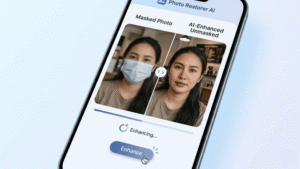
When we say “unmasking,” we do not mean that we will be able to see exactly what is behind that mask. Rather, we will be able to see what that part of your face could look like using artificial intelligence.
For example, assume that you have taken a picture in which your eyes alone are visible. The AI tool analyzes your eye shape, your face structure, your skin tone, etc. Then, using all that information, it creates what that part of your face could be, i.e., your nose and your mouth.
However, remember that the result isn’t your real face, it’s just a smart guess by AI.
How AI Technology Helps Restore Faces
You might be thinking how this works.
The AI technology is exposed to thousands (or millions) of pictures of faces. This enables the AI technology to learn the following:
- The structure of the faces of humans
- How facial features work together
- What the faces of humans look like naturally
Once the AI technology is exposed to your masked photograph, the following happens:
- The AI technology recognizes the faces in the photograph.
- The AI technology analyzes the visible features, e.g., the eyes and forehead.
- The AI technology completes the missing features using the patterns learned.
- The AI technology improves the quality of the photograph so that the features are more visible.
AI technology can also work as a photo restoration tool. This means it can help remove the mask, make the photo clearer, and improve its overall quality. That’s why many people use AI tools to improve old photos and bring them back to life.
Best Apps to Use in Unmasking Your Photo Using AI Technology
There are many apps available that can assist you in unmasking your photograph using AI technology. Below are some of the best apps that are user-friendly.
1. Remini
Remini is widely recognized as the best AI technology-based app that offers powerful features in the enhancement of faces.
If you want a detailed guide, you can also read our article on how to improve photo quality using Remini Pro.
- The app is designed to enhance the clarity of the photograph.
- The app is effective in sharpening blurry faces and old faces.
- The app is capable of reconstructing faces using AI technology.
2. FaceApp
FaceApp is another popular app for editing photos using AI features.
- Facility for editing or transforming faces.
- Facility for enhancing features on your face.
- Facility for beginners.
Although FaceApp is not specifically designed for removing masks, it is still helpful in enhancing your features.
3. PicsArt
PicsArt is a flexible photo editing tool.
- Facility for AI editing.
- Facility for both manual and automatic editing.
- Facility for creative edits.
You can make several edits with PicsArt that will improve your masked features.
Step-by-Step Guide to Unmask a Photo Using AI
Now, let’s go through a simple process. No technical knowledge required.
Step 1: Open the App
First, download and open your chosen app, for example, Remini or PicsArt.
Make sure your app is updated for the best performance.
Step 2: Upload the Masked Photo
Select the photo you want to edit.
Choose a photo where:
- The face is visible, even if it’s partially visible
- The lighting is not too dark
Step 3: Select Face Restore or Enhance Option
Look for options like:
- Face Enhance
- AI Restore
- Portrait Enhancement
These features help improve your face in the photo.
Step 4: Wait for Processing
Once you have applied the option, the AI will start working on your photo.
This may take a few seconds.
You may see:
- Sharper facial features
- A more complete face
- More clarity in your photo
Step 5: Save the Edited Photo
Now, review your photo after processing.
If you are satisfied:
- Save your photo
- Compare your before and after photo
If you’re not satisfied, you can try again.
Tips to Get Better Results
To get the best possible result with your AI unmasking of an image, here are some tips to follow:
- Use Clear Photos
It is best to use clear photos to get better results. - Ensure Face is Partially Visible
The face of the subject in the image should be partially visible in order to get good results. - Use Good Lighting
The image should have good lighting in order to get good results. - Avoid Highly Blurry Photos
It is best to avoid highly blurred photos to get good results. - Use Different Apps
It is best to use different apps to get good results.
Common Mistakes to Avoid
While using these tools, people make some common mistakes.
Here’s what to avoid:
- Perfect restoration
AI cannot restore an exact original face - Using low-quality images
Poor-quality images result in poor output - Editing an image too many times
This may make your image look unnatural - Not considering lighting issues
This affects accuracy - Using only one tool at a time
Using more than one tool may give better results
Is It Safe to Use AI Photo Editing Tools?
This is an important question.
In general, most popular apps are safe, but you should always be careful.
Here are some safety tips:
- Use trusted apps only
Stick to well-known platforms - Check app permissions
Avoid giving unnecessary access - Read privacy policies
Understand how your data is used - Avoid unknown websites
Some sites may misuse your images
You should always protect your personal data, especially when uploading photos.
When Should You Use a Photo Unmasking Tool?
You might be wondering when it is necessary to make use of these tools. There are many instances in which you will need to make use of these tools. These include:
- Old family photos
- School memories
- Improvement of group photos from mask-wearing days
- Social media profile photos
- Improvement of personal photos
For instance, let’s assume that you came across an image from 2020. Every person in the image is wearing a mask. However, it is a special memory. You will be able to make it look better with the help of AI tools.
Conclusion
Photos have been unmasked using AI in ways that have never been easier. With just a few taps on your screen, your photos will be enhanced, making even the most hidden faces visible.
But remember that:
- AI is not perfect
- AI works on estimates
- The final product depends on the quality of your photo
If you get your hands on the right tool and follow some basic tips, you’ll be amazed at what you can achieve.
So if you have old photos that were originally masked, give it a try. Be realistic, but enjoy bringing your memories closer to life.