
We all have photos that didn’t turn out the way we expected. Maybe the picture is blurry, pixelated, or too dark. This often happens when photos are taken with older phones, downloaded from social media, or captured in low light. The good news is that you can now enhance low-quality images using AI in just a few clicks, no advanced editing skills needed.
AI tools have made image improvement faster and easier than ever. Whether it’s an old family photo or a blurry screenshot, you can fix it quickly and get a much clearer result.
What is a low-quality image?
A low-quality image is a picture that doesn’t look clear or sharp. There are several reasons why an image may lose quality.
Common issues in low-quality images:
- Low resolution: The image has fewer pixels, making it look unclear
- Blur: The photo is not focused properly
- Noise: Small dots appear in the image, especially in dark photos
- Pixelation: The image looks blocky when zoomed in
Example:
Imagine taking a picture at night without proper lighting. The result may look blurry or grainy. Similarly, screenshots or images downloaded from WhatsApp often lose quality due to compression.
What is AI Image Enhancement?
AI image enhancement is a technology that uses artificial intelligence to automatically improve the quality of images.
Instead of editing manually, AI analyzes the image and fixes problems like blur, noise, and low resolution. It can even add missing details to make the image look sharper.
How it works (simple explanation):
- AI scans your image
- Detects areas that need improvement
- Enhances clarity, brightness, and details
- Produces a better-quality version
Example:
If you upload a blurry selfie, AI can sharpen your face, improve lighting, and remove noise, all in seconds.
Why Use AI to Enhance Images?
Using AI tools is much easier compared to traditional photo editing software.
Key benefits:
- Fast results: Improve images in seconds
- Easy to use: No technical skills required
- Automatic fixes: AI handles everything for you
- Better quality: Often gives more natural results
- Saves time: No need for manual adjustments
Example:
Instead of spending hours editing a photo, you can upload it to an AI tool and get a clear image instantly.
How to Enhance Low Quality Images Using AI (Step-by-Step Guide)
If you’re wondering how to enhance low-quality images using AI, follow these simple steps:
Step 1: Upload the Image
Open your chosen AI tool and upload the photo you want to improve.
Step 2: Select Enhancement Options
Some tools allow you to choose settings like sharpening, noise reduction, or upscaling.
Step 3: Click “Enhance”
Press the enhance or improve button. The AI will automatically process your image.
Step 4: Download the Improved Image
Once done, download the enhanced version to your device.
Tip:
Always compare the original and enhanced image to see the difference.
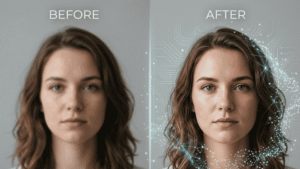
AI Prompt to Enhance Low-Quality Images Instantly
If you want a quick and simple way to improve image quality, you can use the following AI prompt. This prompt helps enhance blurry, pixelated, or low-resolution images and turns them into clearer, high-quality visuals.
Simply copy the prompt below and use it in your favorite AI image enhancement tool. The process is fast, beginner-friendly, and does not require any technical skills.
Image Enhancement Prompt:
Enhance this old or low-quality photo into a high-resolution, ultra-realistic image while keeping the original face and identity unchanged. Improve sharpness, restore details, reduce noise, and apply natural lighting. Upgrade colors to look vibrant and modern, smooth the skin texture realistically, and refine the background into a clean and professional style while preserving the original pose and expression.
Enter Enhance this old or low-quality photo into a high-resolution, ultra-realistic image while keeping the original face and identity unchanged. Improve sharpness, restore details, reduce noise, and apply natural lighting. Upgrade colors to look vibrant and modern, smooth the skin texture realistically, and refine the background into a clean and professional style while preserving the original pose and expression.
You can use this prompt for:
- Old photos
- Blurry images
- Screenshots
- Social media pictures
- Website or blog images
Make sure to upload the best available version of your image for optimal results.
Best Situations Where AI Image Enhancement is Useful
AI image tools are helpful in many real-life situations.
Common use cases:
- Old photos: Restore faded or damaged family pictures
- Social media images: Improve quality before posting
- Website images: Make visuals look more professional
- Screenshots: Enhance clarity for better readability
- Product photos: Improve image quality for online selling
Example:
If you’re running an online store, clear product images can attract more customers. AI can make your photos look sharper and more appealing.
Tips to Get the Best Image Enhancement Results
For better results, follow these simple tips:
- Use the highest quality original image possible
- Avoid over-enhancing (it can make images look unnatural)
- Choose tools that offer preview options
- Adjust brightness and contrast if needed
- Use AI tools that support HD or 4K output
Tip:
Sometimes, less editing gives better results. Keep it natural.
Common Problems When Enhancing Images and How to Fix Them
Even with AI, you may face some issues. Here’s how to fix them:
|
Problem |
Solution |
|
The image looks too sharp |
Reduce sharpening settings or use a softer filter |
|
Colors look unnatural |
Adjust brightness and contrast manually |
| The image is still blurry |
Try another AI tool or use a higher resolution input |
| File size becomes too large |
Compress the image after enhancement |
Is AI Image Enhancement Safe to Use?
Yes, AI image enhancement is generally safe, but you should follow some basic precautions.
Safety tips:
- Use trusted and well-known tools
- Avoid uploading sensitive or private images
- Check privacy policies before uploading
- Do not use unknown or suspicious websites
Example:
If you’re enhancing personal photos, always choose a reliable platform to protect your data.
Future of AI Image Enhancement
AI technology is improving rapidly, and image enhancement will become even more powerful in the future.
What to expect:
- More realistic image improvements
- Faster processing times
- Better restoration of old photos
- Integration with smartphones and apps
- Real-time enhancement while taking photos
Example:
In the future, your phone’s camera may automatically enhance photos using AI, without needing a separate app.
Conclusion
Learning how to enhance low-quality images using AI can completely change how your photos look. Whether you’re fixing old memories, improving social media posts, or enhancing product images, AI tools make the process quick and simple.
With just a few clicks, you can turn blurry or pixelated images into clear and professional-looking photos. The key is to use trusted tools, follow simple steps, and avoid over-editing.
Start using AI today and give your images a fresh, high-quality look!
And if you want to understand how internet speed impacts uploading and sharing images, don’t forget to read our guide on 4G vs 5G: What’s the Real Difference?